

Frequently asked question
 Download FAQs-pdf
Question 1. What is WAP?
WAP (Wireless Application Protocol) is the mobile internet surfing counterpart of 'http'. It is a technology that allows cell phones to display specially formatted Web sites on a small screen in wml/wxml format.
Question 2 . What is WAP Portal?
It is a portal which works on WAP and has all the functionality and utility of a web site.
The only difference is that it is available on Mobile phones. In simple words you can
understand it as a web site whose appearance is customized to make it appear good to the
mobile users and fit into the small mobile screen.
Question 3 . What is BSNL Live?
'BSNL Live', a WAP Portal, is a one stop shop for all your
Information,
Entertainment,
and
Communication related requirements.'BSNL Live' is your window to a wide array
of services that range from hands on access to Videos On Demand that include
Bolloywood, Astrology, Recipes/ Cookery, Entertainment, Cricket, Comics/ Animation,
Movies and Trailers, Music, Multimedia games, Wallpapers of your choice of
tones/tunes , Games on demand, Online SBI banking and social networking sites like facebook, orkut & much more.
Also access and enjoy a host of Value Added Services.
Also access and enjoy a host of Value Added Services.
| Zone | Wap Link |
| North | http://bsnllive.in |
| East | http://bsnllive.in |
| West | http://bsnllive.in |
| South | http://bsnllive.in |
Question 4 . How can I access BSNL Live?

Before accessing 'BSNL Live' you must ensure you have the appropriate settings on your mobile. You may get these settings in following ways: requirements.
Some common settings for the Main Makes are as below
- All the settings required to access 'BSNL Live' & availing different services on 'BSNL Live', will be pushed to your handset by BSNL.
- You can also request for the settings by sending MAKE space MODEL of your handset to 58355 by SMS e.g. Nokia space N79 to 58355 . After you send the SMS you will in response get several settings on your handset viz. 'bsnllive', 'bsnlstream' etc.
- You may also call BSNL Customer Care Center to know the settings.
Some common settings for the Main Makes are as below
- Nokia handset
- Samsung Handset
- Sony Ericsson Handset
BSNLLive:
Goto web ->Press Options->Select Settings->Select General->Select the Access Point as bsnllive as default.
Thereafter whenever you want to access 'BSNL Live' you click on your Web browser in your mobile; ask the Connecting Via
'BSNL Live' will be visible to you and clicking on it will lead you to the Welcome page.
Goto web ->Press Options->Select Settings->Select General->Select the Access Point as bsnllive as default.
Thereafter whenever you want to access 'BSNL Live' you click on your Web browser in your mobile; ask the Connecting Via
'BSNL Live' will be visible to you and clicking on it will lead you to the Welcome page.
BSNLStream:
s
Goto Application->Select Real Player -> Select Options->Select Setings -> Settings ->Select Proxy ->No Then Go back to Network->Select streaming ->
Default Access point Name as 'bsnlstream' will also be selected in your mobile for Watching the Video On Demand e.g. Hello TV, Mobisode , Video Songs.etc
s
Goto Application->Select Real Player -> Select Options->Select Setings -> Settings ->Select Proxy ->No Then Go back to Network->Select streaming ->
Default Access point Name as 'bsnlstream' will also be selected in your mobile for Watching the Video On Demand e.g. Hello TV, Mobisode , Video Songs.etc
BSNLLive:
Choose "Main Menu-> Select "Browser icon -> Select "Settings icon -> Select "Internet Profiles -> Select Radio button to bsnllive
Choose "Main Menu-> Select "Browser icon -> Select "Settings icon -> Select "Internet Profiles -> Select Radio button to bsnllive
BSNLStream:
Choose "Main Menu" -> Choose "Settings" -> Choose "Application" ->Choose "Application Settings" -> Choose "Media Player" -> Choose "Settings" ->Choose "VOD settings" ->Change the default Access Point to "bsnlstream"
Choose "Main Menu" -> Choose "Settings" -> Choose "Application" ->Choose "Application Settings" -> Choose "Media Player" -> Choose "Settings" ->Choose "VOD settings" ->Change the default Access Point to "bsnlstream"
BSNLLive:
Choose "Main Menu" ->Select "Settings" icon->Select "connections" icon->Select "Internet Settings" ->Select "Internet Profiles" ->Select Radio button to bsnllive
Choose "Main Menu" ->Select "Settings" icon->Select "connections" icon->Select "Internet Settings" ->Select "Internet Profiles" ->Select Radio button to bsnllive
BSNLStream:
Choose "Main Menu" ->Choose "Settings" ->Choose "Phone" ->Choose "Application Settings" ->Choose "Media Player" -> Choose "Streaming" ->Choose "Network" -> Change the default Access Point to "bsnlstream".
Choose "Main Menu" ->Choose "Settings" ->Choose "Phone" ->Choose "Application Settings" ->Choose "Media Player" -> Choose "Streaming" ->Choose "Network" -> Change the default Access Point to "bsnlstream".
Question 5. What are the services which I can look for in BSNL Live?
BSNLlive has designed an array of services to aptly quench your daily requirements.
- HelloTV : Watch HelloTV is a Live TV service which offers more than 50 channels on your mobile. This service is available for both 2g and 3g users with compatible handsets. With HelloTV you can now watch Live TV on your mobile anywhere anytime.
- Movies : Movies will be streamed on demand i.e. the content will be played in real time on your mobile from 'BSNL Live' directly without first getting stored.
- Videos: Video clips of 3-5 minutes (approx) on an average are available on demand. You can choose videos and download from the available huge library of content at 'BSNL Live'. The categories of content varies from astrology recipes/ cookery, entertainment, cricket to beauty tips/ clips, comics/ animation, Movies and Movie trailers, Music, Multimedia games and wallpapers, and other different tones/tunes . In addition to the above, more and more categories of video clips will be added to suit every taste and choice.
- Music : Full track song download: You can download full track audio songs (mp3) of your choice through 'BSNL Live'.
- Games : Various Categories of Games viz . Regular (Simple & premium) and branded multiplayer games are available. You will be able to view games that are compatible with your handsets, thus you need not to worry about compatibility of games. You would be required to pay the charges at the time of downloading a game.
- Wallpapers, Ringtones & Comics are other exciting services offered by BSNL LiVE.
- SBI mobile banking One can also download and access mobile banking application i.e SBI FreedoM.
- Popular links of social networking sites Facebook, Orkut and MIG 33 are also available in the BSNL Live.
Question 6 . I sent the SMS to 58355, but didn't recieve any of the BSNL
settings?
You can configure the "bsnllive setting through the website.
You can send the settings yourself to your phone by visiting : WEST ZONE http://210.212.179.183/msp/html/
NORTH ZONE http://218.248.65.83:8081/msp/html/
EAST ZONE http://218.248.71.14/msp/html/
SOUTH ZONE http://218.248.72.246/msp/html/
a) Log-in using your mobile number as 9194XXXXXXXX (replace xxxx..
with your number) and click login.
b) Go to device management tab
c) Select your phone vendor and Phone Model
d) Then click the Configure my phone Button
You can send the settings yourself to your phone by visiting :
b) Go to device management tab
c) Select your phone vendor and Phone Model
d) Then click the Configure my phone Button
Question 7 . I tried the setting through Website but it didn't work. How do I
manually configure the "bsnllive
Question 8. How do I get BSNLLiVE bookmark on my mobile.
Send "bsnlive" to 51010 to get the bookmark.
And TV to 51010 to get the live mobile TV bookmark.
And TV to 51010 to get the live mobile TV bookmark.
And TV to 51010 to get the live mobile TV bookmark.
Question 9 . Do all handsets support BSNL Live & BSNLStream?
- Any handset with WAP 1.2 browsing capability can be used to access 'BSNL Live' Portal.
- For BSNL Stream The hand set should be able to support RSTP streaming.
Question 10 . Can I use any phone handset to use BSNL live service?
Yes, if your handset is GPRS capable and activated for GPRS service. However, only services compatible to your handset will be visible to you. And in case of watching Hello TV/Movies you need a video player supported handset.
Question 11. Do I need to have a 3G connection for accessing BSNL Live and availing services like Video on Demand, Movies streaming, Live TV (Hello TV) streaming Games, Full track download?
'BSNL Live' can be accessed by all GSM (2.5 G and 3G) subscribers. However the Hello TV, videos, movies and full track songs and multiplayer games are heavy on data and to access these services you need to have a 3G connection, else your experience will be greatly reduced and the downloads for audio and video clips will take longer time.
Question 12. Is there any other specific requirement to watch LIVE TV (Hello TV) on user handset?
Your handset must have "BSNL Stream" setting & it should be Video player supported .
Question 13. How to watch Hello TV (Live TV) channels on BSNLlive?
All you need is a GPRS enabled handset that is capable of playing video clips, Go to Bsnl live home page, Click Hello TV & subscribe for Single channel pack or Combo Pack offer.
Before going to the Browser ensure the BSNLStream settings are installed in your handset
Before going to the Browser ensure the BSNLStream settings are installed in your handset
Question 14. What is a single channel Pack & Combo Pack Offer?
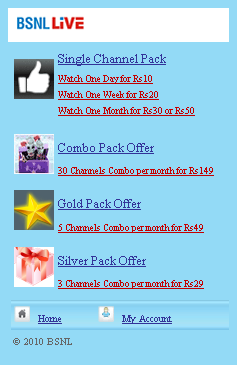
These are two Plans a user can choose. Single channel Pack is available on daily, weekly and monthly plan of a single channel subscription for Rs.10, Rs.20, Rs.30/50 respectively.
Combo Pack is a combination of 30 channels for just Rs.150.
Combo Pack is a combination of 30 channels for just Rs.150.
Question 15. What are the different channels we can watch on Hello TV?
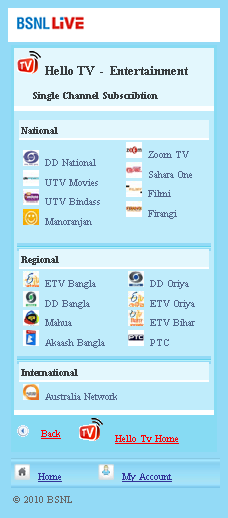
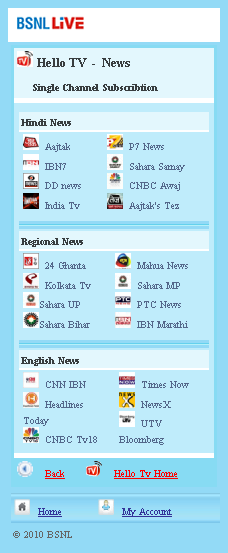
Hello TV offers you an exciting assortment of over 50 channels that range from News to Entertainment, movies to music in addition to channels according to your regional preferences.
Some of the channels available are listed below. Please note that regional channels are available in relevant regions only. Also note that this list is indicative only. Please visit BSNL LiVE portal for a detailed of channels available in your zone.
Some of the channels available are listed below. Please note that regional channels are available in relevant regions only. Also note that this list is indicative only. Please visit BSNL LiVE portal for a detailed of channels available in your zone.
- Channel
- East Zone
- North Zone
- West Zone
- South Zone
| Channel Name | Language | Category |
| Manoranjan TV | Hindi | Entertainment |
| Hamaar TV | Bhojpuri | Entertainment |
| katyani tv | Hindi | Devotional |
| Shakti TV | Hindi | Infotainment |
| Sadhna News - Madhya Pradesh/Chhatisgarh | Hindi | news |
| PTC News | Punjabi | News |
| PTC Chakde | Punjabi | Entertainment |
| Mahuaa | Bhojpuri | Entertainment |
| Mahuaa News | Bhojpuri | News |
| Aastha | Hindi | Devotional |
| Aastha Bhajans | Hindi | Devotional |
| Divya | Hindi | Devotional |
| Music India | Hindi | Music |
| P7 News | Hindi | News |
| IBN7 | Hindi | News |
| Australia Network | Hindi | Infotainment |
| IBN7 Lokmat | marathi | News |
| Network 18 | Hindi | Infotainment |
| NewsX | Hindi | News |
| Sahara Samay | Hindi | News |
| Sahara Bihar | Bihari | News |
| Sahara Samay- NCR Delhi | Hindi | News |
| Sahara Samay UP | Hindi | News |
| Sahara Samay Mumbai | marathi | News |
| Sangeet Bhojpuri | Bhojpuri | Music |
| Raj Digital Plus | Tamil | movie |
| Raj TV | Tamil | Entertainment |
| Raj News Tamil | Tamil | News |
| Raj Music Kannada | Kannada | Music |
| Raj Music Malayalam | Malayalam | Music |
| Raj News Telugu | Telugu | News |
| CNN IBN | English | News |
| CNBC TV18 | Hindi | News |
| CNBC Awaaz | Hindi | News |
| Aajtak | Hindi | News |
| Headlines Today | English | News |
| Tez | Hindi | News |
| Sahara One | Hindi | Entertainment |
| Sahara Filmy | Hindi | movie |
| Sahara Firangi | Hindi | Entertainment |
| UTV movie | Hindi | movie |
| UTV Bloomberg | English | news |
| UTV Bindaas | Hindi | Entertainment |
| Polimer TV | Tamil | Entertainment |
| B4U Music | Hindi | Music |
| B4U movie | Hindi | movie |
| Aakash Bangla | Bangla | Entertainment |
| 24 Ghanta | Bangla | news |
| Channel Name | Language | Category |
| TV9 Gujrat | Gujrathi | news |
| News9 | English | News |
| TV9 Mumbai | Hindi | news |
| ETV 2 | Telugu | Entertainment |
| ETV-BANGLA | Bangla | Entertainment |
| ETV-MARATHI | Marathi | Entertainment |
| ETV-KANNADA | Kannada | Entertainment |
| ETV-ORIYA | Oriya | Entertainment |
| ETV-M.P. | Hindi | Entertainment |
| ETV-U.P | Hindi | Entertainment |
| ETV-BIHAR | Hindi | Entertainment |
| ETV-RAJASTHAN | Hindi | Entertainment |
| ABP Plus | Hindi | News |
| ABP Ananda | Bangali | News |
| ABP News | Marathi | News |
| Angel TV | Tamil | Entertainment |
| SpaceToons | Hindi | Kids |
| Sun TV | Tamil | Entertainment |
| Sun Music | Tamil | Music |
| Sun News | Tamil | News |
| Chutti TV | Tamil | kids |
| Aditya TV | Tamil | comedy |
| Surya TV | Malayalam | Entertainment |
| Kiran TV | Malayalam | Music |
| Teja TV | Telugu | movie |
| Gemini News | Telugu | News |
| Gemini Music | Telugu | Music |
| Navvulu TV | Telugu | comedy |
| Kushi TV | Telugu | kids |
| Udaya TV | Kannada | Entertainment |
| Ushe TV | Kannada | comedy |
| Udaya 2 | Kannada | music |
| Udaya movie | Kannada | movie |
| Chintu TV | Kannada | kids |
| Saam TV | Marathi | Entertainment |
| Kairali TV | Malayalam | Entertainment |
| Jaya TV | Tamil | News |
| JAYA Plus | Tamil | News |
| Jaya Max | Tamil | Entertainment |
| DD News | Hindi | News |
| DD Punjabi | Punjabi | Entertainment |
| DD Sports | Hindi | Sports |
| DD1 | Hindi | Entertainment |
| DD6 Oriya | Oriya | Entertainment |
| DD7 Bangla | Bangla | Entertainment |
East:
| News | ABP Plus, Aajtak, IBN7, Live India, P7 News, Sahara Samay, CNBC Awaj, Aajtak's Tez, ABP Ananda, 24 Ghanta, Sahara UP, Sahara Bihar, Mahua News, Sahara MP, PTC News, IBN Marathi, CNN IBN, Headlines Today, CNBC Tv18, NewsX, UTV Bloomberg, DD News |
| Entertainment | DD National, UTV Movies, UTV Bindass, Manoranjan, Zoom TV, Sahara One, Filmi, Firangi, DD Oriya, ETV Bangla, DD Bangla, Mahua, Akaash Bangla, ETV Oriya, ETV Bihar, PTC , Australia Network, B4u movies, Home shop 18 |
| Music | B4U Music, Music India, Mh1, |
| Kids | Space Toon, |
| Devotional | Aastha |
| Sports | DD Sports, Star Cricket |
North:
| Devotional | Aastha, Sudarshan, Divya |
| Entertainment | B4U Movies, DD National, DD Punjabi, B4U Music, ETv MP,ETV Rajasthan,ETV UP, Hamaar Tv,Mahuaa,Manoranjan TV, Filmy, Firangi, Sahara One, Shakti TV, UTv Bindaas, UTV Movies |
| News | Aaj Tak, ABP Plus, Bloomberg UTV, CNBC Awaaz, CNBC TV18, CNN IBN, DD News, Headlines Today, IBN 7, Tez IBN Lokmat, Mahuaa News, P7 News, PTC Chak De, PTC News, Sadhna News, Sahara Samay NCR, Sahara Samay UP |
| Sports | DD Sports |
| Music | Music India, Sangeet Bhojpuri |
| Kids | Spacetoon |
| Shopping | Home Shop 18 |
West:
| 1 | sadhna |
| 2 | saam tv |
| 3 | space toon |
| 4 | B4U music |
| 5 | B4U Movies |
| 6 | sahara |
| 7 | sahara samay mumbai |
| 8 | Divya |
| 9 | TV9 Gujrati |
| 10 | News 9 |
| 11 | TV9 Mumbai |
| 12 | Aastha |
| 13 | Aastha bhajan |
| 14 | DD sports |
| 15 | India TV |
| 16 | katyani |
| 17 | Music India |
| 18 | mi marathi |
| 19 | ABP News |
| 20 | network 18 |
| 21 | sakthi TV |
| 22 | lemontv |
| 23 | manoranjan tv |
South:
| 1 | CNBC TV 18 |
| 2 | UTV Bloomberg |
| 3 | ABP Plus |
| 4 | CNBC Awaaz |
| 5 | Sahara Samay |
| 6 | CNN IBN |
| 7 | TV 5 Telugu |
| 8 | Sakshi TV |
| 9 | Kalaignar News Tamil |
| 10 | Raj News Tamil |
| 11 | Raj News Telugu |
| 12 | Vissa |
| 13 | Spacetoon Kids |
| 14 | Angel TV |
| 15 | Aradhana TV |
| 16 | SS Music |
| 17 | Raj Music |
| 18 | Isai Aruvi |
| 19 | Raj Music Kannada |
| 20 | Gemini Music |
| 21 | Udaya TV |
| 22 | Udaya Movies |
| 23 | B4U Music |
| 24 | B4U Movies |
| 25 | UTV Binbass |
| 26 | UTV Movies |
| 27 | Polimer TV |
| 28 | Kalaignar TV |
| 29 | Raj TV |
| 30 | SS Entertainment |
| 31 | Sirippolli |
| 32 | Sun TV |
| 33 | Aditya TV |
| 34 | Jaya Plus |
| 35 | Jaya Max |
| 36 | Jaya TV |
| 37 | Raj Digital Plus |
| 38 | Mega TV |
| 39 | Vasanth TV |
| 40 | Teja TV |
| 41 | ABP Plus |
| 42 | CNBC Awaaz |
| 43 | Sahara Samay |
| 44 | CNN IBN |
| 45 | TV 5 Telugu |
| 46 | Sakshi TV |
| 47 | Kalaignar News Tamil |
| 48 | Raj News Tamil |
| 49 | Raj News Telugu |
| 50 | Vissa |
| 51 | Spacetoon Kids |
| 52 | Isai Aruvi |
| 53 | Raj Music Kannada |
| 54 | Gemini Music |
| 55 | Udaya TV |
| 56 | Udaya Movies |
| 57 | B4U Music |
| 58 | B4U Movies |
| 59 | UTV Binbass |
| 60 | UTV Movies |
| 61 | Raj TV |
| 62 | Sirippolli |
| 63 | Sun TV |
| 64 | Aditya TV |
| 65 | Jaya Plus |
| 66 | Jaya Max |
| 67 | Jaya TV |
| 68 | Raj Digital Plus |
| 69 | Mega TV |
| 70 | Teja TV |
Question 16. What is Video on Demand and how will I be charged for the video I choose?
Video on Demand allows you to choose your favorite video clips out of hundreds available on 'BSNL Live'. The price of an individual Video will be based on its type and it may vary from one video to another. The price of individual videos range from Rs.5/- to Rs. 20/- while a full length movie is priced at Rs. 40/-.
For each video the price will be displayed when you click on it to purchase. You will have to agree to the price of the video before the video download begins. But the deduction from your account will happen only after a successful download.
For each video the price will be displayed when you click on it to purchase. You will have to agree to the price of the video before the video download begins. But the deduction from your account will happen only after a successful download.
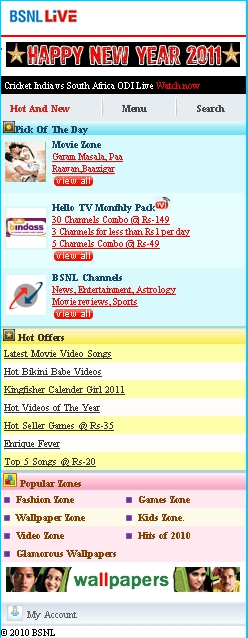
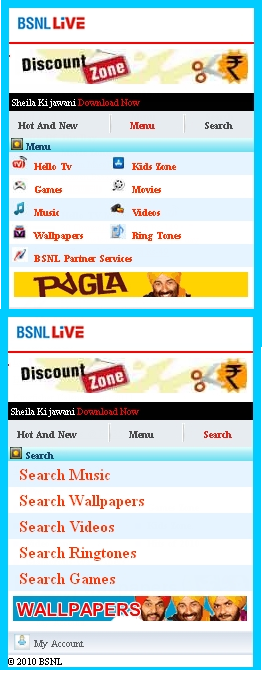
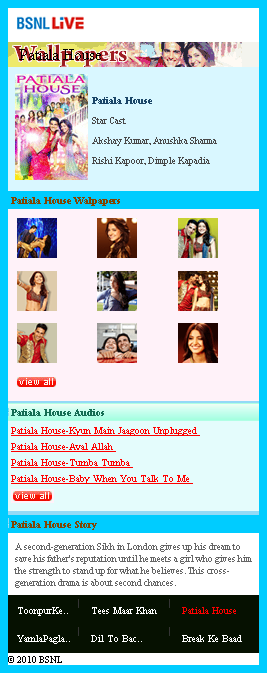
Question 17. What is Welcome Screen and Main Menu?
Question 18 . How is BSNLlive WAP portal different from other WAP portals?
BSNLlive is the first 3G WAP portal that offers features that are not available on any other WAP Portal. Features and services like Live TV direct streaming, Movie on Demand, Unlimited 3G Games, Full length Audios, Video on Demand, Ringtones-True-tones & Poly-tones make BSNLlive completely unique
Question 19 . Are there any special Offers available on BSNLlive & Do we get new content on Festivals/Occasions?
Special offers like wallpapers @ Rs5, Audios @ Rs5, Games @Rs 35, Video on demand @ Rs 10 are available during the festive season. A regular and consistent update by the BSNL team allows you to access content that is fresh and the latest.
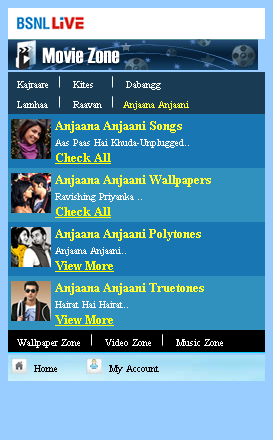
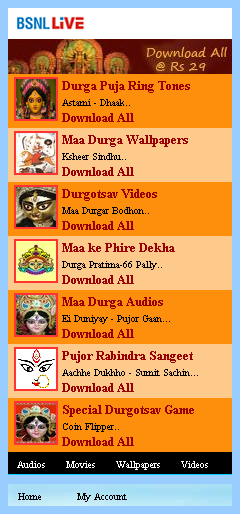
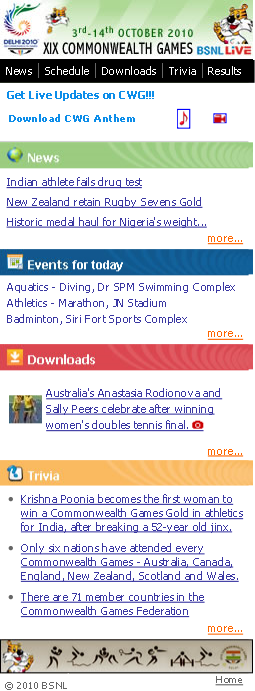
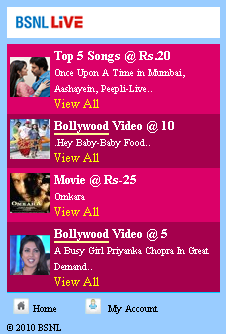
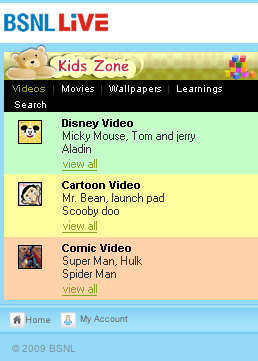
Some Zones are shown in the following screen shot:
Question 20 . How can I use these services/how can I download a song, video or a wallpaper ?
Process for downloading is similar for all categories and are self explanatory on 'BSNL Live'. For your reference it has been explained here pictorially for videos:
Figures are in the following page:

- It is the home page view; now click on the link you wish to explore. In this case videos.
- The above click opens the category view within Videos. Based on your interest you can explore further. For example you move to Bollywood videos category.
- This list gives you various contents grouped under the Bollywood video section. You need to choose one video out of many.
- Once you click on a video it opens a dedicated page to the selected content. You click on the Buy tab.
- 'A click on the 'Buy' tab displays the price of the content. By clicking on the download link you finally give your consent to buy the content and content download starts. Once the download is complete the amount is deducted.
Figures are in the following page:
Question 21 . Where can I get the list of Games & Music available for download ?
On 'bsnlive' Welcome WAP page you will find categories for Music and Games. Clicking on any one of these will provide you with the list of games or music which are compatible with your handset and is available for download
Question 22. What is a video/movie streaming? How it is different from video clips download?
Streaming video/movie is content sent in compressed form over the Internet in a continuous stream and displayed to you on your mobile device in real time without getting stored in your mobile. The streaming content (Movie) can be viewed in a fixed time window i.e. whenever it is being streamed; whereas a downloaded video can be viewed at any point of time after download and any number of times.
For a streaming movie you have to remain connected to the network during the playtime of the movie. Streaming is good to view large video files as the same cannot be stored on the available limited memory of mobile. In case of streaming the content charges shall be deducted at the start of streaming.
For a streaming movie you have to remain connected to the network during the playtime of the movie. Streaming is good to view large video files as the same cannot be stored on the available limited memory of mobile. In case of streaming the content charges shall be deducted at the start of streaming.
Question 23. Do I need to view the full movie at a stretch or am I allowed to take breaks ?
The movies are streaming content; which is not allowed to be downloaded. For your convenience BSNL splits the movies in suitable 2-6 parts of 20-30 minutes each. You can view one part at a time by clicking on each part of movie one by one. However you should finish viewing all parts of the movie in specified allotted time which is 48 hours at present. The charges of the movie will be deducted only once, at the start of first part. It is not necessary to watch the parts sequentially. These parts can be viewed randomly and also repeatedly in the allotted time.
Question 24 . What are the advantages of using BSNL Live?
You get an access to the latest and best collection of a complete range of categories, be it videos or tones, movies or music and devotional too.
Question 25 . Is BSNLlive available on both post paid and prepaid ?
The service is available to all GSM (2.5 G & 3G) subscribers of BSNL whether Postpaid or prepaid.
The service is available to all GSM (2.5 G & 3G) subscribers of BSNL whether Postpaid or prepaid.
Question 26 . What if I receive a call or an SMS while a download is in process?
When one receives a call or an SMS during the download/streaming following
happens:
- In case of Streaming
2G subscriber Session breaks. Subscriber will have to start the streaming from beginning.
3G subscriber Streaming pauses and resumes after the call/SMS. - In case of Video on demand
2G subscriber Download pauses and resumes after the call/SMS.
3G subscriber - Download pauses and resumes after the call/SMS.
Question 27. What if my GPRS connectivity breaks at any point while using BSNL Live services ?
If the GPRS connectivity breaks at anytime during executing any operation then an appropriate error message such as 'Network Connection Failed' will be displayed and you will be prompted to 'Try again'.
Question 28. What if my phone gets switched off or I move out of the network area or I move from 3G area to 2.5 G area during download from BSNL Live?
Until you have a successful download no money is deducted from your account. In such a situation when you come back into the network area, you can retry for your content. If you move from 3G area to 2.5G area the download speed will reduce to the speed of a 2.5 G network. Download/ streaming continuity is defined in Question no. 17. In case of partial download/streaming the surfing/download charges shall be applicable.
Question 29. I have downloaded a song/video/wallpaper but I am not able to find it in my mobile or it is not opening?
For any issue as such please contact BSNL Customer Care Center. The call centre staff will help you with a solution for your issue in a minimum possible time.
Download file association and download of file into device handsets can sometime be saved to a folder which the user has previously moved his files to or downloaded content into.
Download file association and download of file into device handsets can sometime be saved to a folder which the user has previously moved his files to or downloaded content into.
Question 30. What happens if I lose my phone or if I change my mobile handset/device ?
You can start using the services as soon as you buy your new handset, new SIM and your handset is configured for GPRS & 'BSNL Live'.
Question 31. What are the charges for services at BSNL Live?
Whenever you want to buy/download any content the price will be displayed informing you about the same before you buy. The surfing/download charges for the content will be separate and as per your data plan.
| CONTENT | PRICE |
| AUDIO SONGS | Rs. 15 |
| GAMES | BASIC Rs.35 PER DOWNLOAD PREMIUM RS. 50 PER DOWNLOAD BRANDED / MULTIPLAYER RS. 100 PER DOWNLOAD |
| WALL PAPERS | Rs. 10 |
| FULL LENGTH MOVIE | Rs. 40 PER MOVIE |
| HELLO TV | Rs. 10 PER DAY PER CHANNEL Rs. 20 PER WEEK PER CHANNEL Rs. 30 PER MONTH PER BASIC CHANNEL Rs. 50 PER MONTH PER PREMIUM CHANNEL Rs. 149 PER MONTH BOUQUET/COMBO PACK OF 30 CHANNELS Rs. 49 PER MONTH BOUQUET/COMBO PACK OF 5 CHANNELS Rs. 29 PER MONTH BOUQUET/COMBO PACK OF 3 CHANNELS Rs. 20 PER DAY - CHAMPIONS LEAGUE T20 LIVE STAR CRICKET Rs. 50 PER WEEK - CHAMPIONS LEAGUE T20 LIVE STAR CRICKET Rs. 125 FOR FULL SERIES - CHAMPIONS LEAGUE T20 LIVE STAR CRICKET |
| MOBILE EPISODE (i) CLIP DURATION 4 TO 5 MINUTES SHORT FORMAT VIDEO [DOWNLOAD] (ii) CLIP DURATION 20 TO 40 MINUTES [STREAMING] |
Rs. 20 |
| FULL TRACK MUSIC 1. FILM BUNDLE (a) PREMIUM (b) REGULAR 2. ALBUM BUNDLE FULL ALBUM DOWNLOAD |
Rs. 99
|
| MOVIE STREAMING BUNDLE | Rs. 99 FOR BUNDLE OF 3 MOVIES |
| RINGTONES POLYTONE B. TRUETONE |
Rs. 10 PER TONE |
| COMICS 1. On DOWNLOAD: (A) REGULAR (B) PREMIUM 2. ON SUBSCRIPTION |
Rs. 10 PER DAY Rs. 20 PER COMIC Rs. 30 PER DAY |
| PREMIUM COMIC STRIP
ON SUBSCRIPTION (B) ON DOWNLOAD |
Rs. 10 PER DAY Rs. 30 PER MONTH RS. 3 PER DOWNLOAD |
| VIDEO ON DEMAND RECIPE AND COOKING TIPS VIDEO |
Rs. 10 PER CLIP Rs. 5 PER CLIP / |
SUPER SAVER PACK (DISCOUNT ZONE) |
Rs. 20 FOR BUNDLE OF TOP 5 SONGS |
Question 32. Are there any charges for surfing on BSNL Live?
Yes, the data surfing/download charges will be applicable as per your subscribed data plan.
Question 33. Can I use BSNL Live while on roaming?
Yes you can use 'BSNL Live' while on roaming as long as you have an access to a 3G or a GPRS network without any change in the gprs/3G settings.
Question 34. How can I unsubscribe any or all of the services using 'BSNL Live'?
You can view your subscriptions through 'MyPage' option on 'BSNL Live'. To unsubscribe any Value Added Service you will have to click on the individual subscribed service and choose the 'unsubscribe' option. However it is recommended that you benefit from the pack till the validity of the subscription ends as the subscription will not automatically renew unless you purchase a new pack again.
Question 35. Is it a must to have 3G connection to avail the services mentioned above?
3G Connection is advisable to experience Video on Demand, Movie streaming, Full track song download and multiplayer games as 3G will help in better browsing and better user experience. So why wait? Migrate to 3G to now and experience the thrill.
Question 36. Will I face any problem of settings in case I want to go for any of the services?
There are no settings required for these services except Hello TV where you need 'bsnlstream' setting You just need to subscribe to GPRS/3G Service and ensure appropriate GPRS/3G settings are on your handset( Detailed steps given in FAQ no.12.).
Question 37. What are the handsets supported by BSNL Live Services ?
The handset should be capable of accessing WAP/GPRS enabled services. For videos, the handset should support video protocols like RTP and have an inbuilt real player.
Some of the services (videos/ Games etc.) will not be visible to you if your handset is not capable of supporting these services. Only those services which are supported by your handset will be visible to you from 'BSNL Live'.
Some of the services (videos/ Games etc.) will not be visible to you if your handset is not capable of supporting these services. Only those services which are supported by your handset will be visible to you from 'BSNL Live'.
Question 38. What are the services suitable and recommended to me if I am a 2G subscriber?
You may use services like Hello TV & movies however the streaming speed may not be good and services which are not video intensive like ring tones, wall papers, simple games, etc are very good for 2g subscribers.
Question 39. What is the difference between BSNL Live and SAFARI/GALAXY portals of BSNL?
While the SAFARI/GALAXY portal provides only the content suitable for 2G /2.5G subscribers viz. ring tones, wall paper, simple games etc. BSNL Live' will provide additional contents suitable for 3G subscribers viz. more than 50 Live TV channels streaming , Movies, Video on demand, Video streaming, Multiplayer Games, Full track music downloads etc.
Question 40. How do I reach BSNL Customer care?
You can reach BSNL Customer care at
| Zone | Toll Free | Other |
| North | 1800-180-1503 | 094160-24-365 |
| East | 1800-180-1503 | 094340-24-365 |
| West | 1800-180-1503 | 094220-24-365 |
| South | 1800-180-1503 | 094000-24-365 |